Combining subtitle files is common when separate video parts are joined into one final export. If you simply paste SRT files together, part two may start at 00:00:00 and overlap part one instead of appearing after it.
A clean merge adds the correct time offset to later files, renumbers cues, checks boundaries, and exports one continuous subtitle file for the joined video.
This guide explains how to combine subtitle files safely, whether you are joining lessons, interviews, movie parts, event recordings, or edited chapters.
Why combining subtitles needs timing offsets
Each subtitle file may be timed from the start of its own video part. When those parts are joined into one long video, the second subtitle file must start after the first video segment ends.
For example, if part one is 12 minutes long, every cue in part two needs a 12-minute offset before it can appear in the combined timeline. Part three needs the combined duration of parts one and two, and so on.
Cue numbering should also be rebuilt. Repeated cue numbers may not break every player, but clean numbering makes editing, review, and troubleshooting easier.
Boundary checks are important. If the first file has captions after the actual video cut or the next file starts too soon, viewers may see overlaps or missing context around the join.
Accurate merge timing depends on the real duration of each video part, including intros, fades, and silence.
Part 1 duration: 00:12:00,000
Part 2 original first cue: 00:00:03,000
Part 2 merged first cue: 00:12:03,000
Step-by-step: combine subtitle files
Prepare the video timeline first, then combine subtitles to match that timeline exactly.
Confirm the final video order and duration of each part.
Open the first subtitle file as the starting timeline.
Add the duration of part one as an offset to every cue in part two.
Repeat cumulative offsets for additional parts.
- Confirm the final video order and duration of each part.
- Open the first subtitle file as the starting timeline.
- Add the duration of part one as an offset to every cue in part two.
- Repeat cumulative offsets for additional parts.
- Merge the adjusted cues into one file.
- Renumber cues from top to bottom.
- Check the join points for gaps, overlaps, or missing context.
- Preview the combined subtitle with the final joined video.
Practical examples
Real subtitle work usually fails at boundaries: the first spoken line, a scene change, a translated phrase that becomes longer, or a platform upload that expects a different format. Use the examples below as a quick quality check before you export.
Part two captions need an offset equal to the final timestamp of part one.
Lesson captions can be merged when lessons are exported as one continuous video.
Break recordings from multiple cameras may need careful boundary checks before merging captions.
Subtitle files are pasted together, creating duplicate cue numbers and overlapping timestamps.
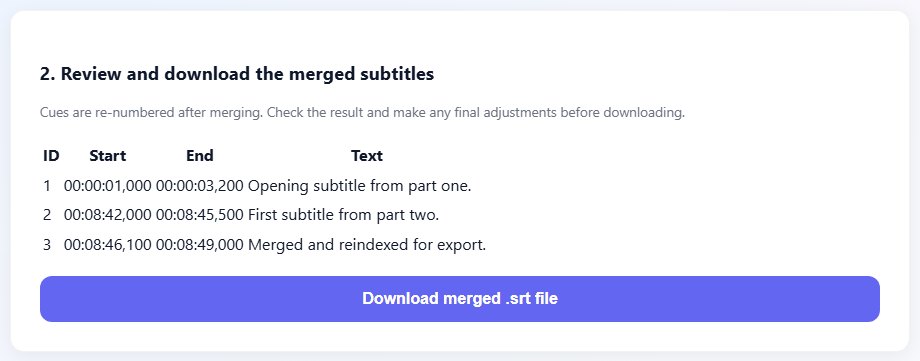
Later files are offset, cues are renumbered, and the merged subtitle follows the final video timeline.
Common mistakes to avoid
Most subtitle problems become harder when the source file is edited without a plan. Keep an original copy, make one focused change at a time, and test the output in the environment where viewers will actually use it.
- Pasting SRT files together without shifting later parts.
- Using estimated durations instead of the real video segment lengths.
- Forgetting to renumber cues after merging.
- Ignoring captions near the join point.
- Combining subtitles before the final video edit is locked.
- Not previewing the merged output with the joined video.
Conclusion
Combining subtitle files is mostly about respecting the final timeline. Once each part receives the correct offset, the rest is cleanup, numbering, and review.
Keep the original part files, export a clean merged subtitle for the final video, and test every join before delivery.
Related tools
Use these TranslateSubtitles.net tools when you are ready to apply the workflow from this guide.
Related guides
FAQ
Can I combine SRT files by copy and paste?
Only if you also offset later timestamps and clean cue numbering. A merge tool is safer.
What offset should I use for part two?
Use the exact duration of part one in the final joined video.
Should I merge before editing the video?
It is better to merge after the final video timing is locked.
Can I combine different subtitle formats?
Convert them to one clean format first, then merge.