Merging subtitles sounds simple: put one file after another. In practice, good merging requires checking timestamps, video part lengths, cue numbering, and overlaps. If part two starts at 00:00:00,000 but your final video continues after part one, the second subtitle file must be shifted forward before the files are joined.
This guide explains how to merge subtitles safely, when to shift a section first, and how to export one clean SRT file. It is useful for split lectures, multi-part downloads, course videos, and edited clips that have separate subtitle files.
Before you merge subtitle files
Collect the subtitle files in the same order as the final video. Name them clearly, such as part-1.srt, part-2.srt, and part-3.srt. Open each file briefly to confirm the language, format, and approximate duration. Mixing versions is the most common cause of bad merged subtitles.
Check whether the final video is one continuous file or separate files. If the video remains split, you may not need to merge subtitles. If the video has already been joined into one MP4, the subtitle timestamps must match the joined timeline.
Step-by-step: merge SRT subtitle files
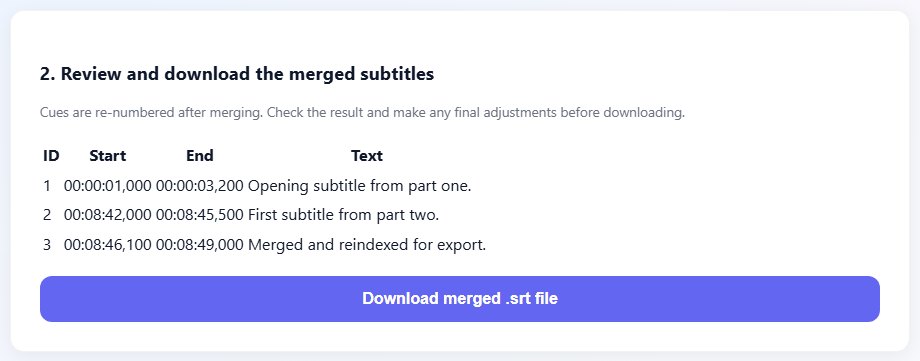
A correct merge preserves reading order and makes cue numbers sequential. The final SRT should not contain two cue number 1 blocks or a second section that restarts at zero unless the video itself also restarts.
- Open the Merge Subtitles tool.
- Add the subtitle files in the same order as the final video.
- Check whether each later file needs a time offset based on the length of the previous video part.
- If a part starts at zero but should appear later, shift that part with the Subtitle Shifter before merging.
- Merge the files and review the output cue order.
- Open the merged file in the Subtitle Editor if you need to fix a small overlap or typo.
- Export the final SRT and test it with the joined video.
Tips for cleaner merged subtitles
If you know the exact duration of part one, use that as the offset for part two. For example, if part one ends at 00:12:30,000, the first cue in part two should start after that point in the merged file. Add a small gap if the joined video has a transition.
Keep line breaks natural after merging. Some files use long two-line captions while others use short one-line captions. The merge process should not rewrite style unless you choose to clean or edit the text afterwards.
The transition between files deserves extra attention. Watch the last thirty seconds of one part and the first thirty seconds of the next part after merging. If captions overlap, repeat, or leave a long silent gap, fix that boundary before checking the rest of the file.
If you are merging translated subtitles, make sure every part uses the same translation style. Inconsistent names, formal and informal pronouns, or different punctuation rules can make the final file feel stitched together even when the timing is correct.
Check the join point first
The boundary between part one and part two is where most merge errors appear, so review that area before proofreading the full file.
Common mistakes when merging subtitles
- Joining files without shifting later parts to the final video timeline.
- Uploading files in the wrong order.
- Mixing different languages or different video releases.
- Leaving duplicate cue numbers after manual merging.
- Not testing the merged SRT near the transition between parts.
Related tools
Use these tools when you are ready to apply the workflow from this guide.
Related guides
FAQ
Can I merge two SRT files into one?
Yes. Use a merge tool, keep the files in order, and make sure later sections have the correct timeline offset.
Do I need to renumber SRT cues after merging?
Yes. A clean merged SRT should have sequential cue numbers from top to bottom.
What if part two subtitles start at zero?
Shift part two forward by the duration of part one before merging, or use a merge workflow that applies an offset.
Can I merge subtitles in different formats?
Convert them to a common format first. SRT is usually the simplest format for merging and testing.