Syncing subtitles online is useful when you need a quick fix, you are working on a shared computer, or you only need to shift a file by a few seconds. A browser tool can read the subtitle file, adjust timestamps locally, and export a corrected SRT without requiring a full video editing application.
The key is to treat online syncing as a timing workflow, not a guessing game. You should identify whether captions are early or late, choose the right amount, test the result, and export only after checking more than one part of the video.
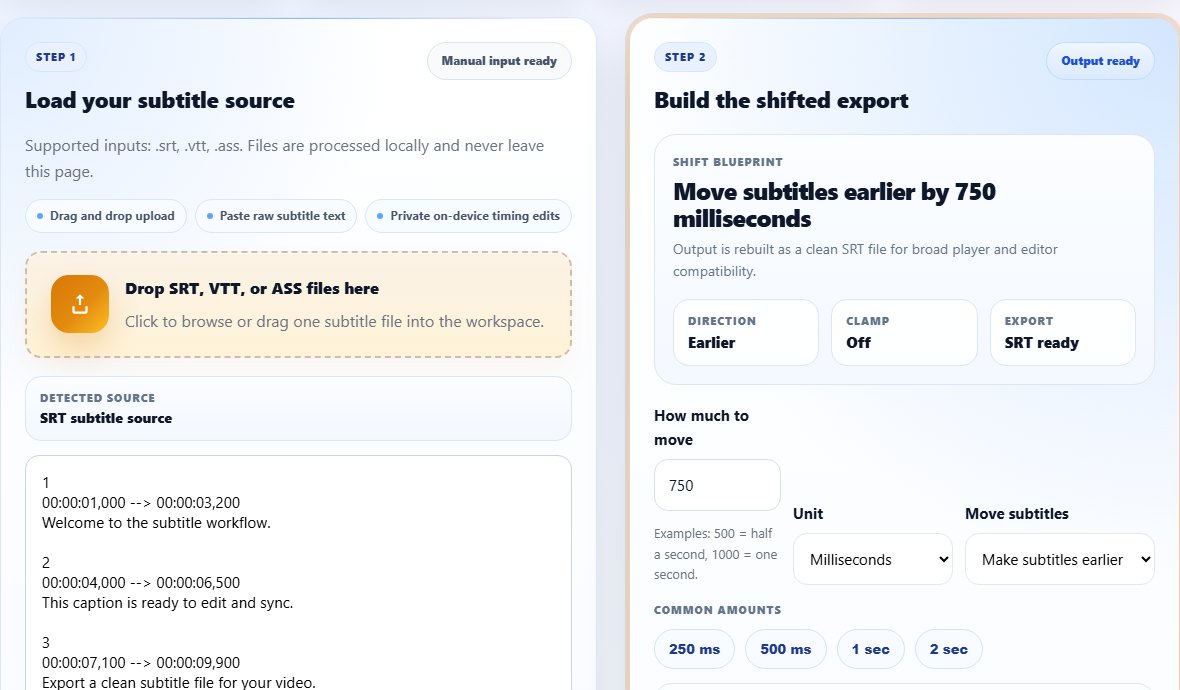
Prepare the subtitle file
Start with the cleanest source file you have. If the file has strange spacing, duplicate captions, or unreadable characters, fix those issues before syncing. Timing tools work best when the cue structure is valid. A messy file can produce a valid-looking export that still behaves badly in a player.
If your subtitle file is not SRT, you can still use browser tools. TranslateSubtitles.net accepts common subtitle sources in several tools, and you can convert the final output when a specific platform requires VTT or another format.
Step-by-step: sync subtitles online
Online syncing is especially effective for fixed offsets. If subtitles drift over time, use the online tool to confirm the first offset, then decide whether the file needs section editing or a better source subtitle.
- Open the Subtitle Shifter.
- Upload your subtitle file or paste the subtitle text.
- Find a scene where the subtitle timing problem is obvious.
- Enter a small offset, such as 500 milliseconds, or a larger offset in seconds if the mismatch is obvious.
- Choose whether to make subtitles earlier or later.
- Run the shift and copy or download the output.
- Load the new file in your video player and test the beginning, middle, and end.
- Repeat with a smaller adjustment if the result is close but not perfect.
Tips for better online subtitle syncing
Use 250 ms or 500 ms increments for fine tuning. Most viewers can feel a half-second error, but very tiny differences are less noticeable than captions that appear too early and spoil dialogue.
If your file starts at 00:00:00,000 and you move subtitles earlier, enable clamping. Clamping prevents negative timestamps, which can break some players or make the first cue disappear.
Online syncing works best when you keep the workflow focused. Do timing first, then text edits, then format conversion. If you convert formats several times while still testing offsets, it becomes harder to know which export is the current good version.
For team workflows, share the corrected subtitle file with a short note describing the shift that was applied. A note like "moved captions earlier by 750 ms" helps another editor understand the change without comparing every timestamp manually.
If the video will be published publicly, do one final playback after uploading, not only before uploading. Some platforms process videos and captions after upload, and that processing can reveal filename, language label, or track selection issues that were not visible in the local test.
Keep each export traceable
Use file names that include the shift amount or version number, so you can return to the best online sync test quickly.
Common online sync mistakes
- Uploading the wrong language or wrong release subtitle file.
- Choosing the wrong direction because the words delay and advance are confusing.
- Not testing the exported file in the target video player.
- Trying to sync a file with broken encoding before fixing the text.
- Replacing the original file before confirming the new file works.
Related tools
Use these tools when you are ready to apply the workflow from this guide.
Related guides
FAQ
Is it safe to sync subtitles online?
On TranslateSubtitles.net, timing changes run in the browser for the shifter workflow, so the file can be processed locally.
Can I sync VTT subtitles online?
Yes. You can shift common subtitle formats and export a clean SRT, then convert to VTT if your platform needs WebVTT.
How accurate should subtitle sync be?
Aim for captions that feel natural. A few hundred milliseconds may be acceptable, but one second is usually noticeable.
Do I need the video file to sync subtitles?
You need to test against the video, but the shifter only needs the subtitle file because it changes subtitle timestamps.