The best free subtitle editor depends on the job. Fixing a two-second delay is different from proofreading a translation, cleaning broken SRT spacing, splitting a long file, or converting VTT to SRT.
Instead of choosing one editor for every task, build a small toolkit around the workflows you actually repeat. Browser-based tools are convenient for quick edits, while desktop software can be useful for frame-level work with video preview.
This guide explains what to look for in a free subtitle editor and how to match tool features to real subtitle problems without wasting time.
What a free subtitle editor should help you control
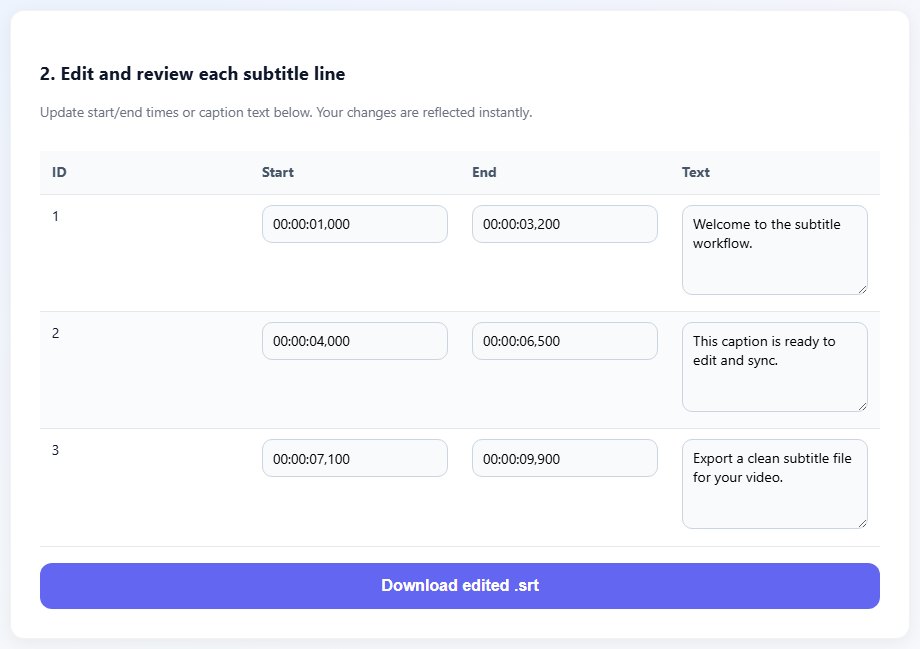
A good editor should protect subtitle structure. It should make cue text, start time, end time, and order clear so you do not accidentally damage blank lines or timestamp syntax.
Timing tools matter when captions are early, late, or drifting. A simple shifter is ideal for whole-file delay. More advanced timing review is useful when only part of the file is broken.
Format support matters when your workflow moves between SRT, VTT, ASS, TXT, and platform-specific exports. A converter should preserve text and timing while changing syntax cleanly.
Privacy and speed matter too. For sensitive scripts or client files, browser-first tools that process common editing tasks locally can reduce unnecessary file movement.
The best editor for a quick delay fix may not be the best editor for translation review or format conversion.
Task -> Best tool
Delay -> Subtitle Shifter
Typos -> Subtitle Editor
SRT to VTT -> Converter
Two parts -> Merge Subtitles
Step-by-step: choose the right free editor
Start with the problem, then choose the narrowest tool that solves it cleanly.
Identify whether the task is text editing, timing, conversion, splitting, merging, cleaning, or translation.
Use a subtitle editor for cue text, line breaks, order, and small timing edits.
Use a shifter when every cue needs the same offset.
Use a converter when the destination requires a different format.
- Identify whether the task is text editing, timing, conversion, splitting, merging, cleaning, or translation.
- Use a subtitle editor for cue text, line breaks, order, and small timing edits.
- Use a shifter when every cue needs the same offset.
- Use a converter when the destination requires a different format.
- Use splitter or merger tools for multi-part videos and long lessons.
- Check whether the tool preserves UTF-8 and subtitle structure.
- Preview the output in the target player or platform.
- Keep the original file and save a clear final copy.
Practical examples
Real subtitle work usually fails at boundaries: the first spoken line, a scene change, a translated phrase that becomes longer, or a platform upload that expects a different format. Use the examples below as a quick quality check before you export.
A focused shifter is faster than opening a full editor when every cue is late by the same amount.
A subtitle editor is better when you need to adjust text, punctuation, and line breaks.
A converter helps when the source is SRT but the website requires VTT.
Every subtitle problem is opened in the same editor, creating slow workflows and accidental structure changes.
Each task uses the right focused tool, and the final subtitle is tested before delivery.
Common mistakes to avoid
Most subtitle problems become harder when the source file is edited without a plan. Keep an original copy, make one focused change at a time, and test the output in the environment where viewers will actually use it.
- Choosing an editor only because it has the most features.
- Using a player delay shortcut instead of saving a corrected file.
- Converting formats without previewing the output.
- Editing sensitive files in tools you do not trust.
- Skipping backups before large changes.
- Ignoring mobile readability when editing line breaks.
Conclusion
The best free subtitle editor is the one that fits the current task with the least risk. Editing text, shifting timing, converting formats, splitting, merging, and translating are related but different jobs.
Build a simple workflow around focused tools, keep clean source files, and test every final export in the destination player.
Related tools
Use these TranslateSubtitles.net tools when you are ready to apply the workflow from this guide.
Related guides
FAQ
What is the best free subtitle editor for SRT?
For simple SRT text and timing edits, a structured subtitle editor is usually better than a plain text editor.
Do I need desktop software?
Not always. Many common subtitle tasks can be handled in the browser, but desktop tools can help with frame-level video preview.
Can free tools translate subtitles?
Some tools can help translate subtitle text while preserving timing, but proofreading is still important.
Should I use separate tools for splitting and merging?
Focused tools often reduce mistakes for splitting and merging because they are built around those exact workflows.